Why Google Ads Shows Errors for Conversion Adjustment Uploads (And Why You Can Safely Ignore Them)

If you're using Google Ads Conversion Adjustments with the Pixel Manager, you've likely noticed error messages in your Google Ads upload reports. Recently, Google has also started sending email notifications and displaying warnings on campaigns about these errors, even though the feature is working exactly as intended.
In this article, we'll explain why these warnings appear, why they're safe to ignore, and what your options are.
What Are Conversion Adjustments?
Conversion Adjustments let you correct conversion data in Google Ads after the initial purchase event has been recorded. When a customer cancels an order, requests a partial refund, or returns a product, the Pixel Manager generates a feed that tells Google Ads to restate or retract those conversions.
This is a powerful feature that gives Google's bidding algorithms more accurate data, which leads to better campaign optimization and a higher return on ad spend (ROAS). Without conversion adjustments, Google continues to optimize based on the original (now incorrect) conversion values, including orders that were fully refunded or cancelled.
Why Google Ads Shows Errors
Here's the core issue: there is no way for you (or the Pixel Manager) to know which orders were originally attributed to a Google Ads click. An order could have come from organic search, a direct visit, an email campaign, a Meta ad, or any other source. Google Ads only tracks conversions from its own clicks. The order data in WooCommerce doesn't tell you which ad platform (if any) drove the sale.
Google themselves acknowledge this in their official setup guide:
"Since there's no way for you to tell in Google Ads if an order was attributed to a Google Ads click, we recommend that you upload all orders that you'd like to adjust. If the order was not attributed to a Google Ads click and therefore not in your Google Ads reports, you'll see an error message letting you know the conversion couldn't be found."
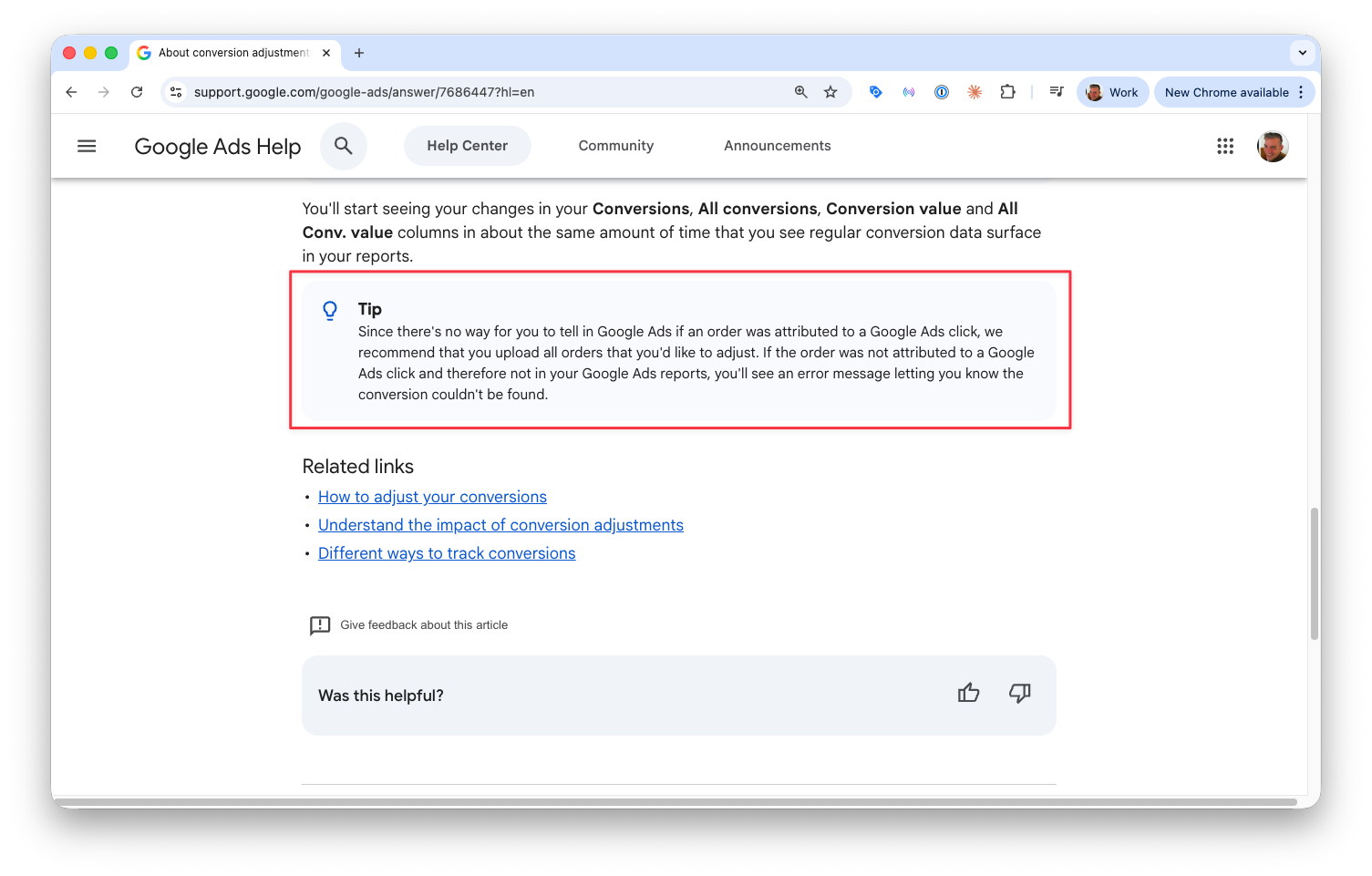
So the Pixel Manager does exactly what Google recommends: it includes all refunded and cancelled orders in the conversion adjustment feed. Google Ads then matches the ones it can and reports errors for the rest.
The error messages you'll see in the upload report are:
- "This conversion does not exist. Double-check all the parameters."
- "The conversion action specified in the adjustment request cannot be found. Make sure it's available in this account."
These errors are expected for any order that didn't originally come from a Google Ads click.
The New Problem: Google's Emails and Campaign Warnings
Until recently, the errors were limited to the upload report, easy to check and easy to ignore. But Google has recently changed their behavior:
- Email notifications: Google now sends emails to advertisers warning them about "problems" with their conversion adjustment uploads.
- Campaign-level warnings: Google Ads now shows warnings directly on campaigns, flagging issues with conversion data.
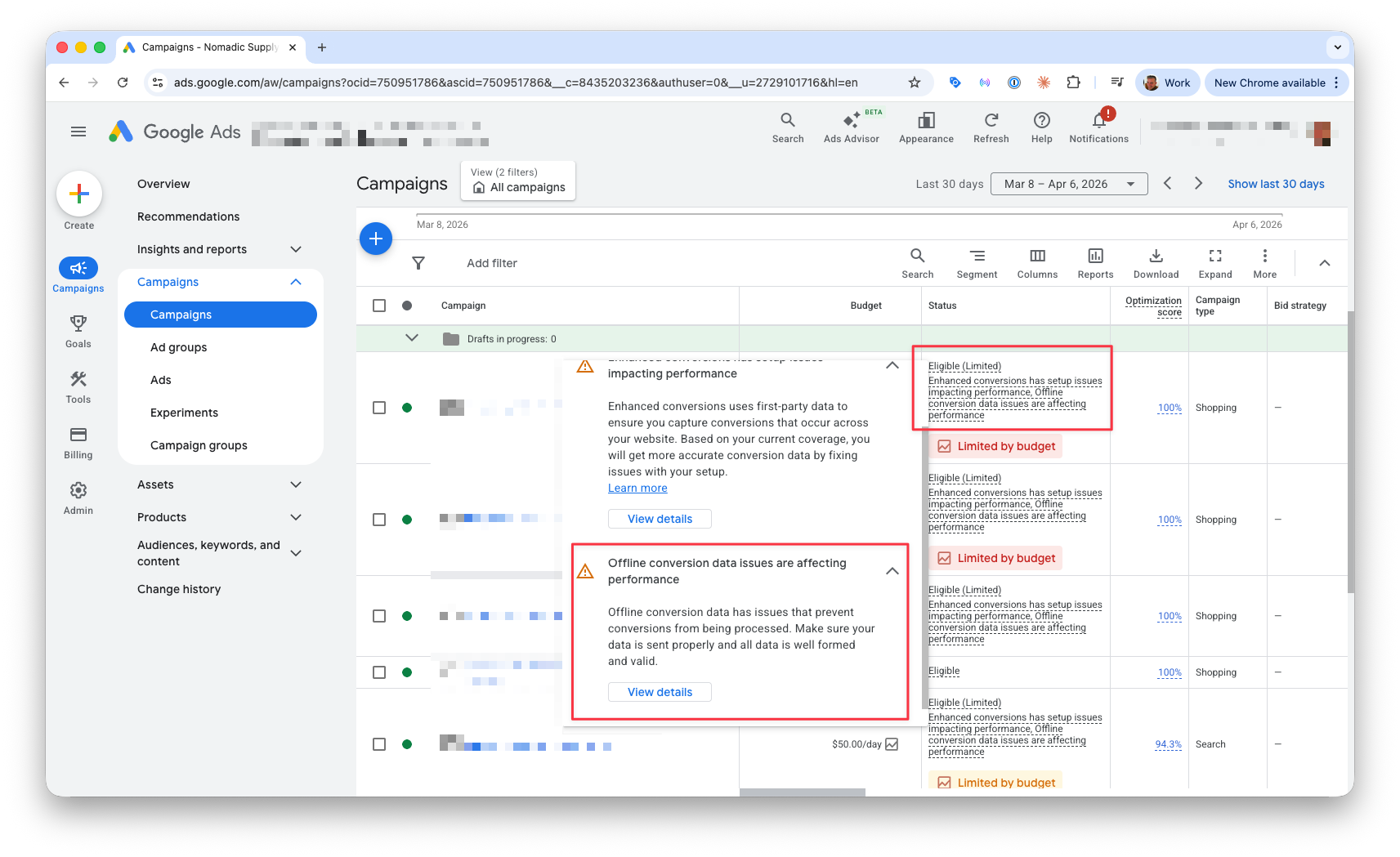
These notifications make the errors look like a serious problem that needs immediate attention. They are not. The underlying behavior hasn't changed. The same errors that were safely ignored in the upload report are now triggering alarmist notifications.
This is a bug on Google's side. Their system is generating warnings for behavior that their own documentation explicitly tells you to expect. We have no way to fix this, and unfortunately neither do you. Only Google can resolve this inconsistency between their recommended setup and their warning system.
What You Should Do
Check That Your Setup Is Correct
Before dismissing the warnings, confirm that your conversion adjustments are working for actual Google Ads conversions:
- Open your conversion adjustment upload report in Google Ads (Goals → Conversions → Uploads).
- Look at the results: you should see a mix of successful and failed rows.
- Successful rows = orders that Google Ads matched to a click (working correctly).
- Failed rows = orders from other sources (expected errors).
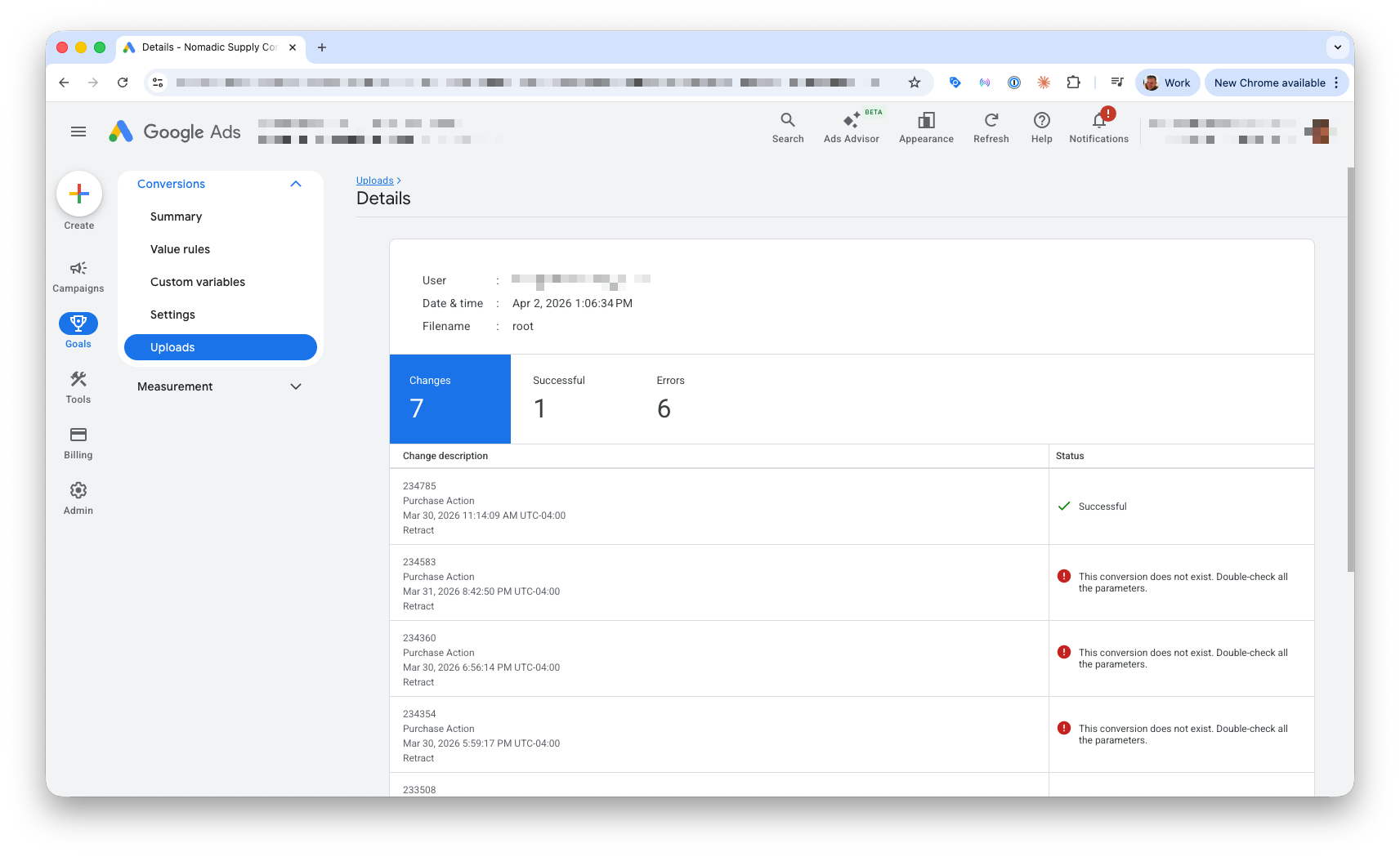
- If all rows fail, something is misconfigured:
- Verify the conversion name in the Pixel Manager matches the Google Ads conversion name exactly (including capitalization and spacing).
- Confirm the upload schedule runs from the same Google Ads account that owns the conversion action.
If you see some successful rows, everything is working as intended.
Understand Your Options
There are three paths forward:
| Option | Pros | Cons |
|---|---|---|
| Keep conversion adjustments enabled (recommended) | More accurate conversion data, better bidding optimization, correct ROAS reporting | You'll see error notifications from Google |
| Disable conversion adjustments | No more error notifications | Google Ads continues to count refunded/cancelled orders as conversions, less accurate data |
| Wait for Google to fix the bug | Would be the ideal outcome | We have no control over Google's timeline, and this could take months or years (or never happen) |
Our Recommendation
Keep conversion adjustments enabled. The value of accurate conversion data far outweighs the annoyance of Google's incorrect warnings. The errors don't affect your campaigns, your bidding, or your actual conversion data. They're purely cosmetic.
The alternative, disabling conversion adjustments, means that Google Ads will count every refunded and cancelled order as a valid conversion. This gives Google's bidding algorithm bad data, which can lead to worse campaign performance and inflated ROAS numbers that don't reflect reality.
Interested to get updates?
Sign up to our monthly newsletter today.What We're Doing About It
We are aware of this issue and are monitoring it closely. We've documented the expected behavior in our setup guide and troubleshooting documentation.
If Google changes their system to allow filtering adjustments by source, or stops generating warnings for expected errors, we'll update the Pixel Manager accordingly.
In the meantime, if you receive an email from Google or see a campaign warning about conversion adjustment errors, you can safely ignore it, as long as your upload report shows a mix of successful and failed rows.
Summary
- Google recommends uploading all orders as conversion adjustments, not just Google Ads orders.
- Errors for non-Google Ads orders are expected and documented by Google.
- Google has recently started sending emails and campaign warnings about these expected errors. This is a bug on their side.
- The Pixel Manager is working correctly. No action is needed on your part.
- Keep conversion adjustments enabled for the most accurate conversion data.
If you have questions, don't hesitate to reach out to our support team.

